If you’ve ever tried to tell a story using AI image generators, the first image drops and it’s stunning. You think, “This is the start of my masterpiece.” Then the next frame lands with a different face, different lighting, and even a different visual style.
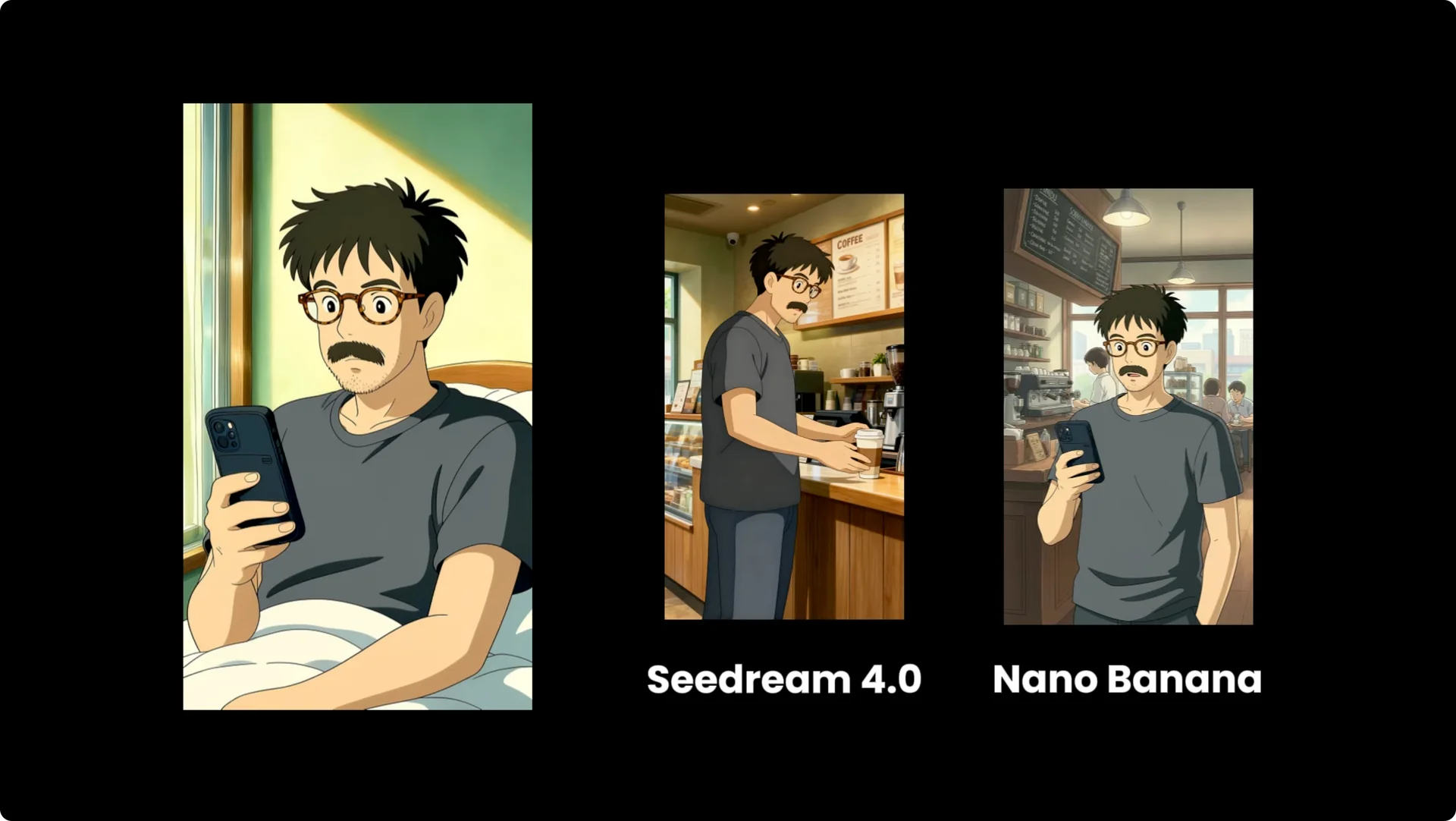
This is due to character drift, lighting mismatch, and stylistic inconsistency. This is where Higgsfield Popcorn comes in. You can lock in a character, lock in the lighting, and generate a complete cinematic storyboard in one go.
They’re calling it the Nano Banana Killer and positioning it as Sora 2, but with full control. It introduces a multi-image pipeline designed for intelligent scene continuity. The core innovation is that Popcorn is designed to think in sequences, not just single images.
Why Higgsfield Popcorn Storyboarding matters
Higgsfield Popcorn offers two distinct creation modes, each tailored to different creative needs and workflows. You can move fast with an AI-driven arc or direct every beat. The point is control across a full sequence, not just a single impressive frame.
Character and style consistency unlock coherent storytelling. Locking the look across shots keeps your audience immersed. That is the difference between a cool image and a finished narrative.
Inside Higgsfield Popcorn Storyboarding
Creation modes
Popcorn lets you upload up to four input references. This is huge. It means you can define a character in one image, a specific object like a product in another, the environment in a third, and maybe a lighting reference in the fourth.
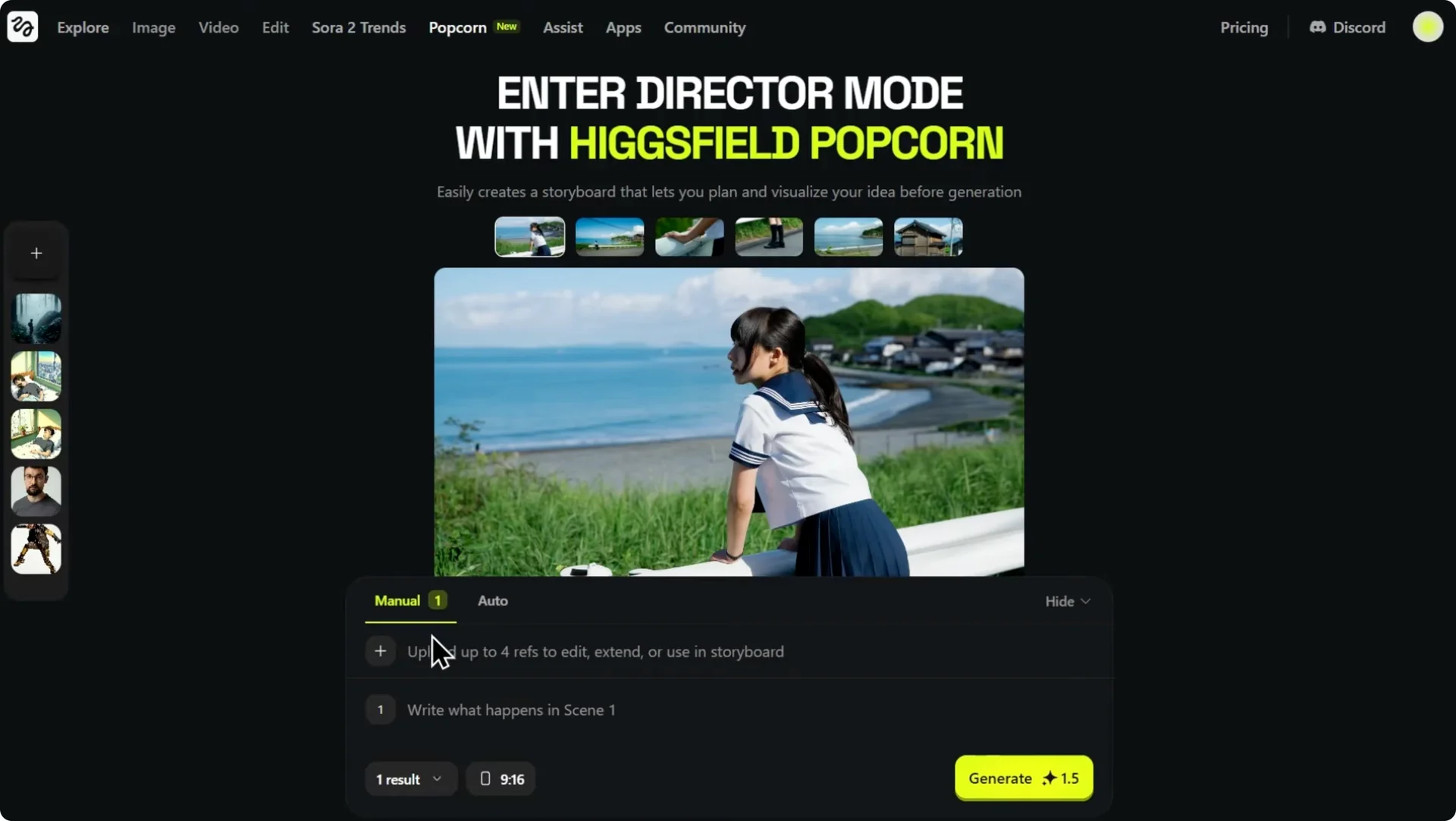
Popcorn intelligently merges them while maintaining consistency. If you switch to manual, you can prompt each individual key frame. This gives you granular control over the action in every single shot.
For speed or if you want the AI to generate a narrative arc, use auto. Here you provide one master prompt for the entire sequence. Finally, you decide how many images you want, anywhere from one up to eight outputs in a single run.
Inputs and outputs
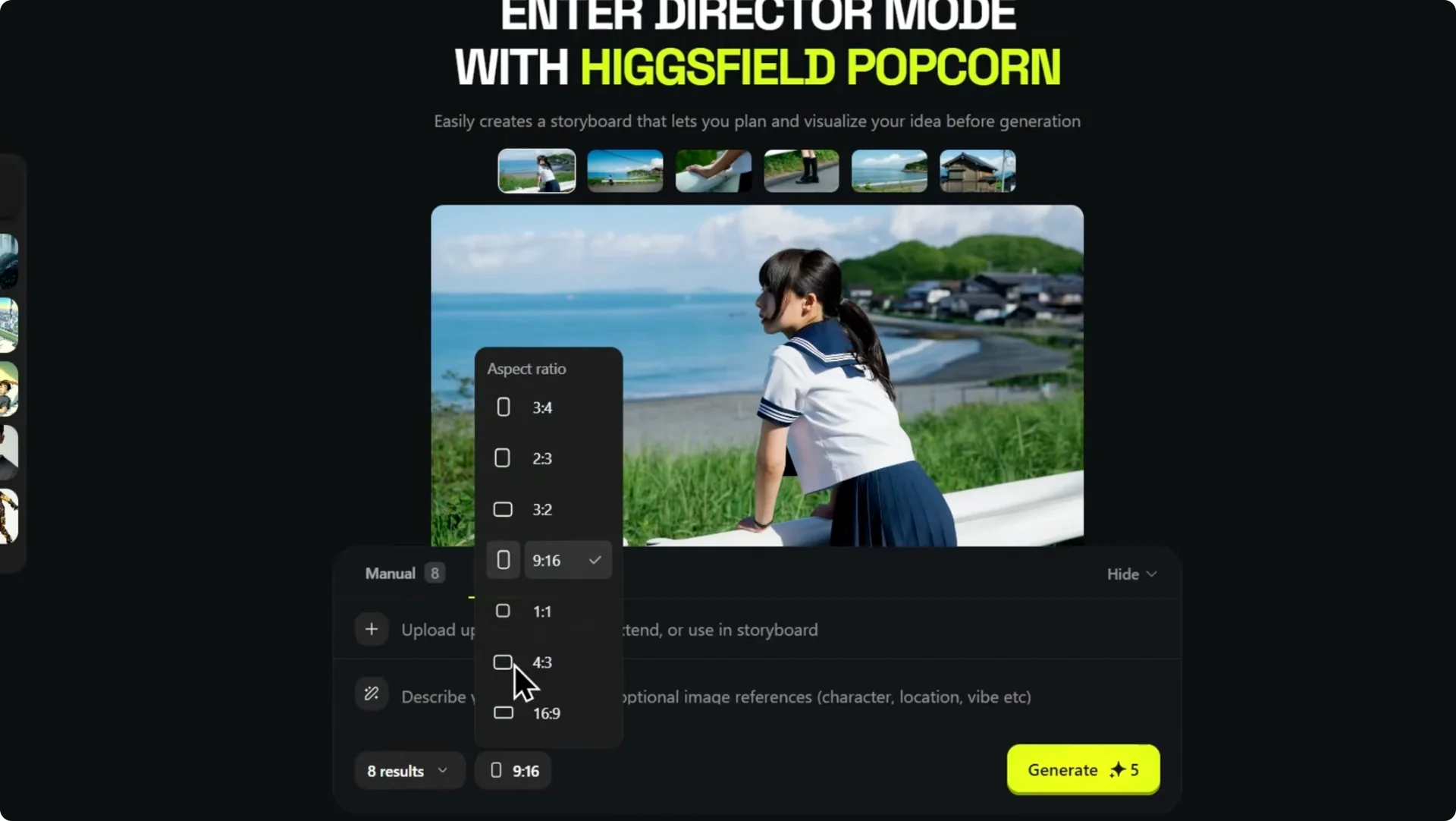
You can select your aspect ratio. You can storyboard for a cinematic widescreen film or create content for vertical platforms. It is an incredibly powerful setup.
For quick wins and setup tips, see our short guide on quick ways to use Higgsfield Popcorn. It pairs well with the modes and reference system described here.
Auto mode in Higgsfield Popcorn Storyboarding
I start with a simple image of a subject and give it as a reference image, then ask it to generate a sequence as per my prompt. I also remove the reference image and generate the same prompt to see what the AI itself comes up with. The AI does a great job of capturing the overall mood and key story elements.
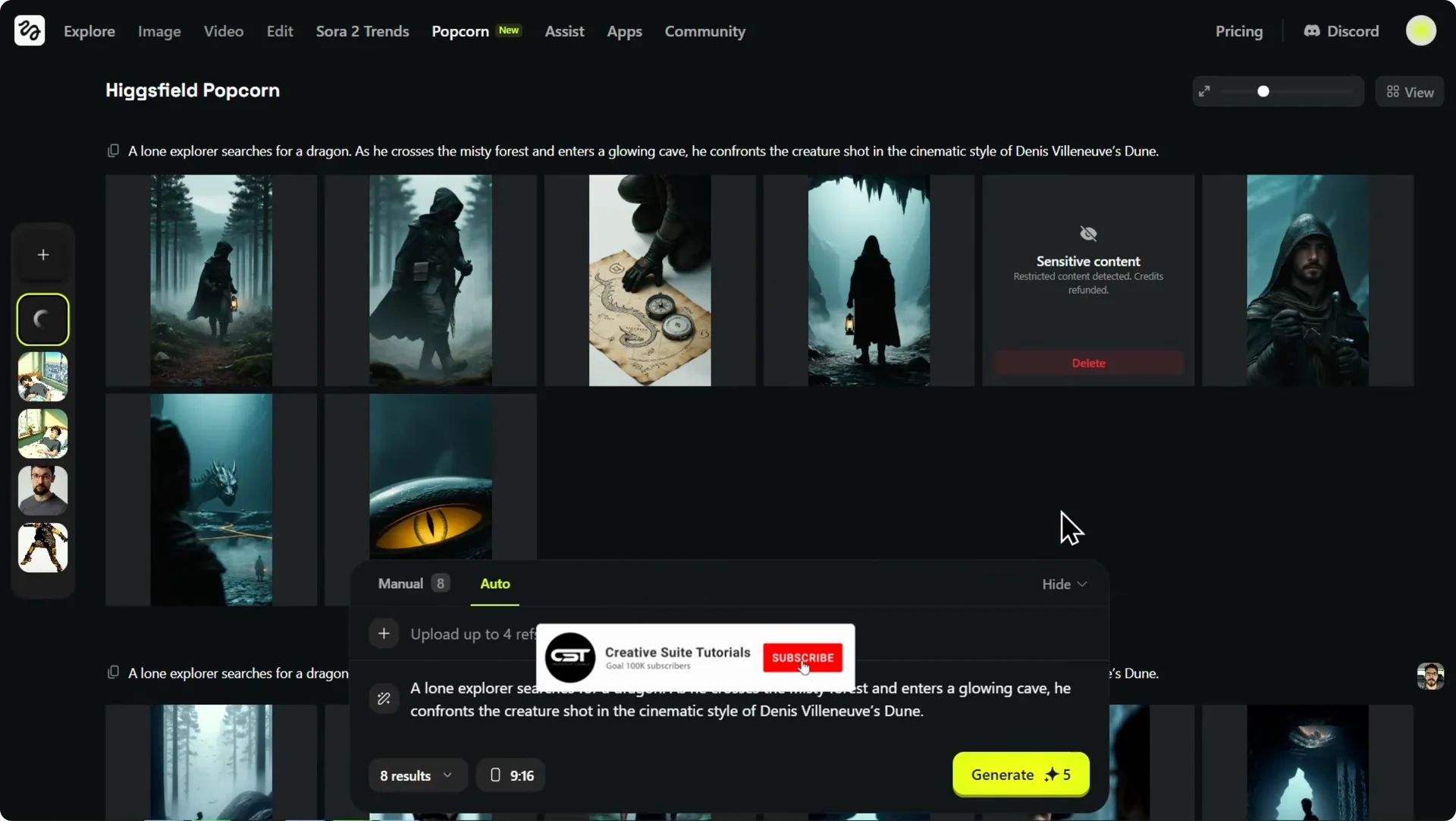
In a second sequence using the exact same prompt but with a single reference photo of our main character, the character is perfectly consistent in every single shot. That is essential for telling a coherent story. With the initial sequence ready, bring it to life.
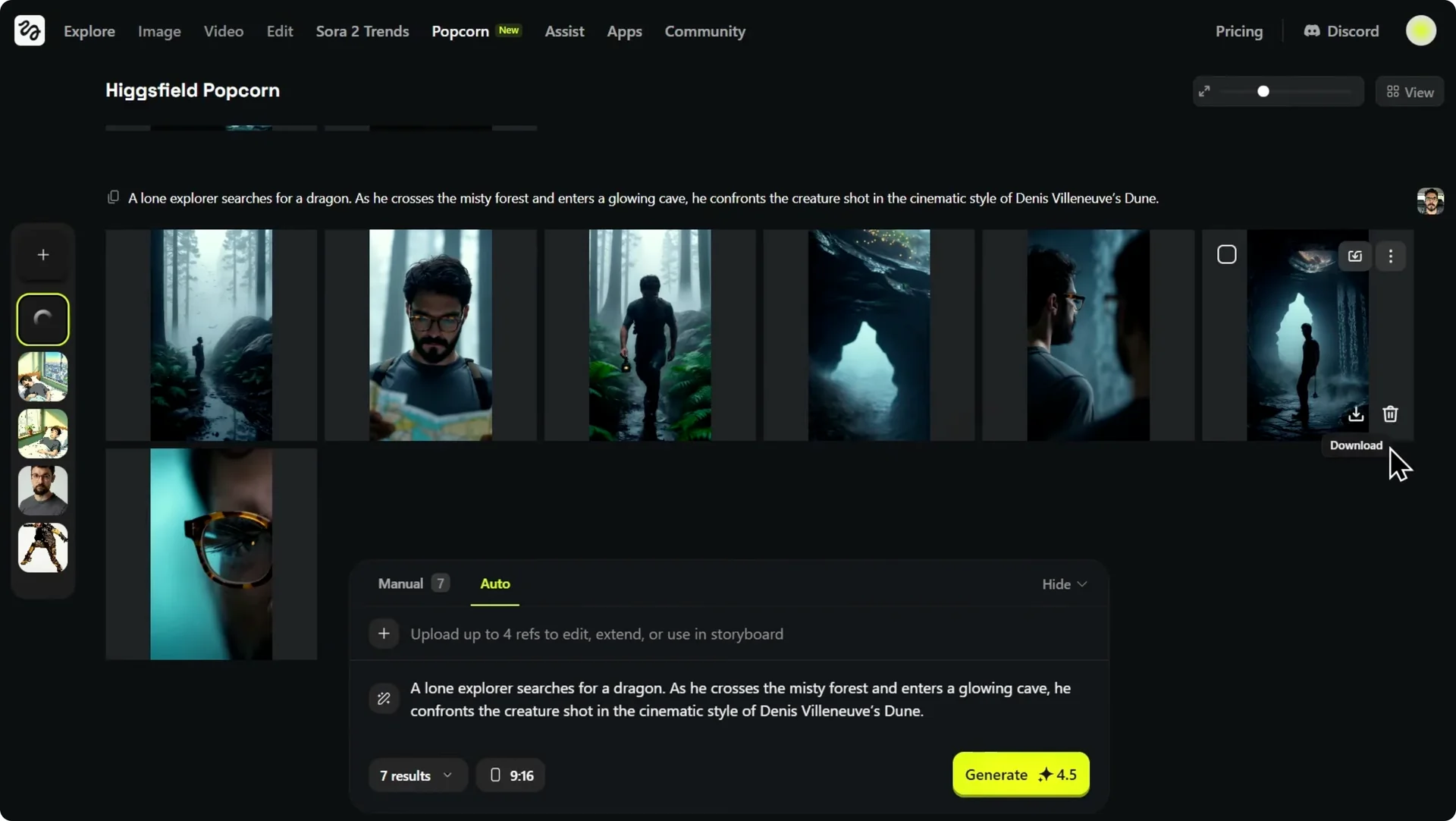
From storyboard to video in Higgsfield Popcorn Storyboarding
One of the most powerful features of the Higgsfield ecosystem is the ability to turn your static storyboard frames into a dynamic video. You have video models that can animate these images and create a full story. To do this, animate the transition between two of your frames.
Animate between frames
Step 1: Select the first shot as the start frame and the second shot, the close-up with the map, as the end frame. This tells the AI to generate the motion that connects these two key moments. It is a simple way to define a move from A to B.
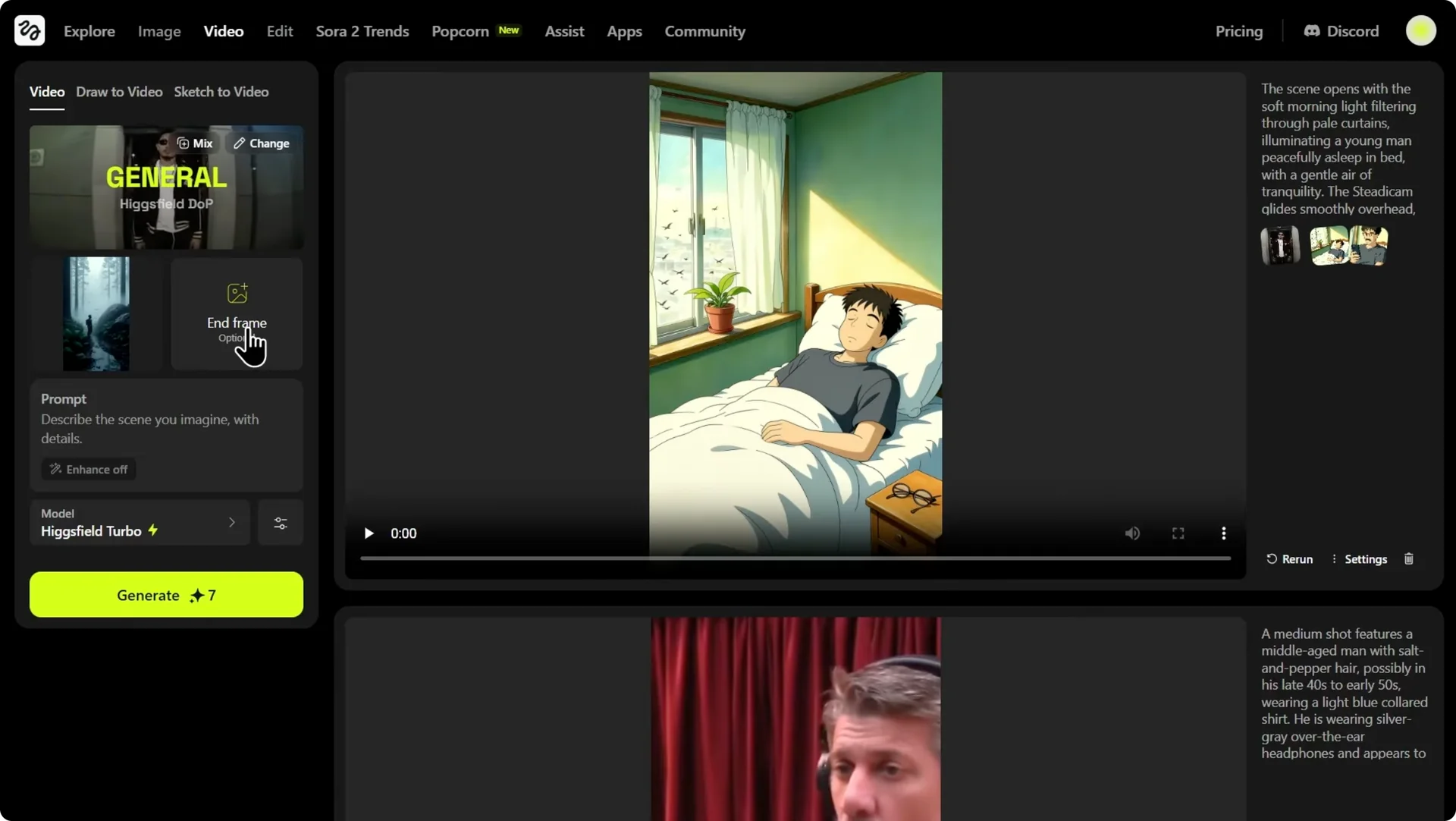
Step 2: Choose a video model that supports this feature. Higgsfield gives you access to several powerful options. For this, use Cling 2.1, which is excellent for this kind of controlled animation.
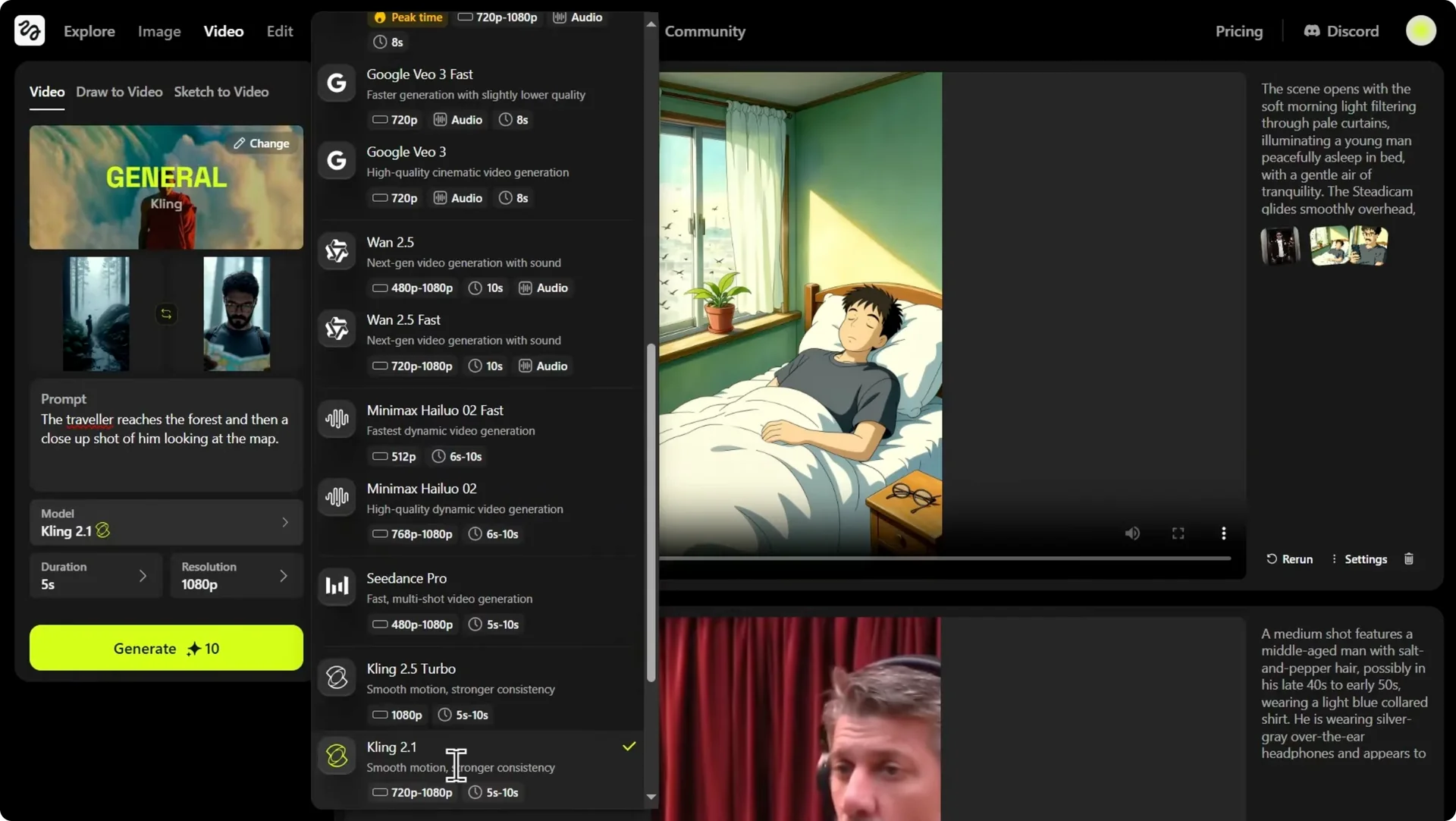
Step 3: Consider alternatives if you want audio. You could select other models like Juan 2.5 or Google VO3.1, which even have the capability to generate sound for your video. Pick based on your final deliverable.
Step 4: Submit the task. It takes a few moments to process. While the video generates, you can continue refining your storyboard.
For a walkthrough focused on video creation flow, check our guide on how to create video with Higgsfield. It complements this step-by-step process.
Directorial control in Higgsfield Popcorn Storyboarding
As a director, I feel we’re missing something crucial: an establishing shot. I want a wide, dramatic shot that shows our explorer’s scale against the vast misty forest he’s in. This is where Popcorn’s deep editing control comes into play.
You can select any frame from your sequence and import it directly into manual mode. Start directing. Here’s how I craft the exact frame I have in mind.
Craft an establishing shot
Step 1: Prompt a wide-angle top view of this person. The result is technically correct. It is a top-down view and the character is perfectly consistent.
Step 2: Assess the feeling. It feels too close, like a security camera, not a cinematic sweeping view. That means the camera language needs more altitude.
Step 3: Add the keyword “aerial” to the prompt. This tells the AI I want more distance and more height. The camera perspective is now higher, giving it that drone shot feel.
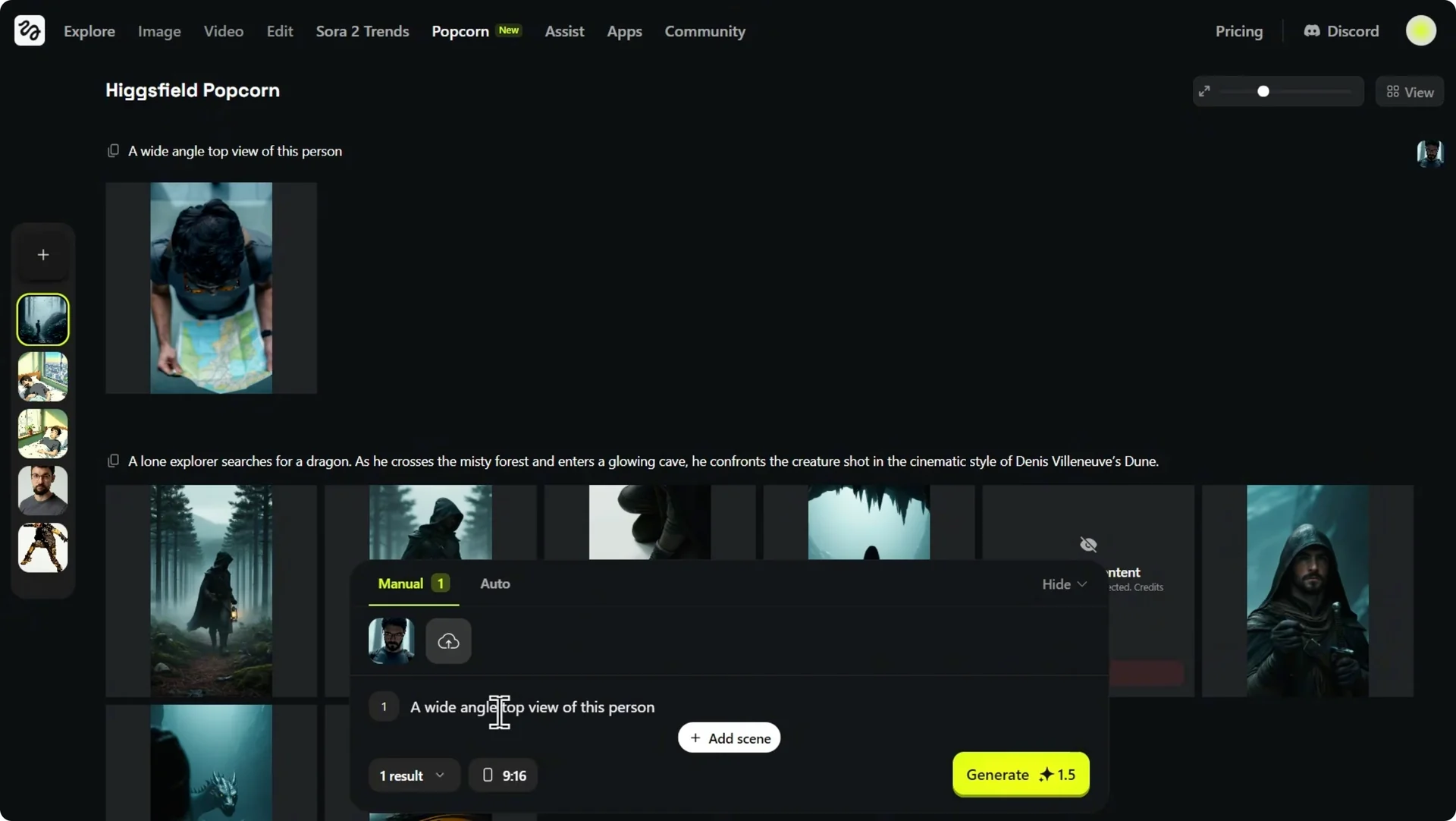
Step 4: Recover missing context. In the process, we lost our environment. Bring back the location from the original story.
Step 5: Finalize the prompt. Use a wide-angle aerial top view of this person standing in a misty forest. This is the shot.
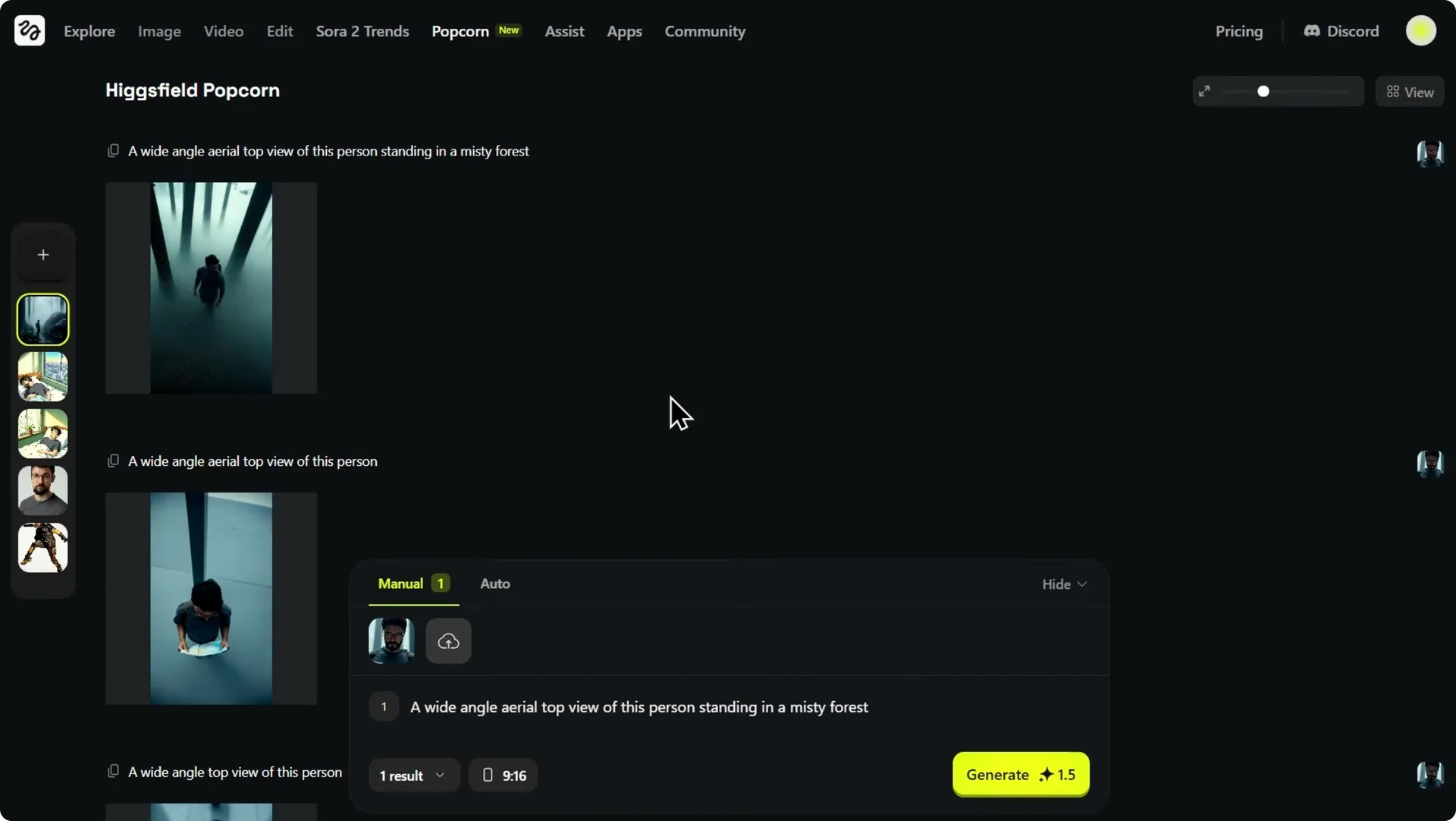
It is a powerful establishing frame that sets the mood, shows the character’s isolation, and maintains perfect continuity with the rest of our storyboard. This iterative process is what it means to think like a director. You guide camera, scale, and environment with intention.
Results and style continuity in Higgsfield Popcorn Storyboarding
The video has finished generating. The AI took the first and second frames and animated the transition between them smoothly. The camera pushes in from that wide atmospheric shot to the tight close-up while maintaining perfect character consistency.
It keeps the cinematic Dune style we established. The implications here go beyond just generating cool sci-fi scenes. You can establish complex moods like a film noir example or experiment with wildly different aesthetics like a Ghibli style.
Who benefits from Higgsfield Popcorn Storyboarding
For filmmakers and animators, the tool locks in the style and the character across the entire sequence. You can iterate on tone and pacing while keeping continuity. That is how you get to publish-ready boards fast.
For marketers and brands, this might be the most practical application. It is the combination of multi-input control and continuity that sets this apart. If you are exploring personality-driven campaigns, see how to build an AI influencer with Higgsfield.
For the first time in the AI image generation space, it feels like the tools are catching up with the demands of professional storytelling. The key takeaway is control. While tools like Sora 2 might generate a video clip from a prompt, you have limited ability to edit specific parts.
Higgsfield Popcorn lets you build the story shot by shot, ensuring every detail matches your vision. You decide the characters, the environment, the lighting, and the moves. That creative authority carries through from frame to finished video.
Final thoughts on Higgsfield Popcorn Storyboarding
Higgsfield Popcorn thinks in sequences, merges up to four references, and gives you manual and auto paths that suit different workflows. It keeps characters and style consistent, then turns boards into motion with model-based animation.
If your goal is coherent, editable storytelling with control over every beat, this is a strong setup. It elevates storyboarding from a single great image to a complete, directable arc.