The idea of having a digital version of yourself has moved from science fiction into everyday technology. With Pika AI Selves, you can create a persistent AI identity built around your personality, knowledge, voice, appearance, and communication style.
This is not just another assistant that answers questions. It is designed to reflect you — how you think, how you speak, what you like, and how you interact with others. Over time, it becomes a consistent digital presence that represents you across platforms.
In this detailed guide, you will learn:
- What Pika AI Selves are
- How they work
- How they differ from typical bots
- Step-by-step instructions to create your own
- Practical use cases
- Safety and content policies
- Supported platforms
- How to train and interact with your AI Self
Let’s begin from the basics.
What Is a Pika AI Self?
A Pika AI Self is a portable AI identity designed around your:
- Personality traits
- Interests and preferences
- Knowledge base
- Communication tone
- Voice
- Appearance
It supports multiple formats, including:
- Text conversations
- Voice and audio
- Images
- Video content
Instead of functioning only as a task assistant, it acts as a broader extension of your digital presence. The goal is to reflect your context, style, and behavior patterns so that your AI Self feels aligned with you.
Over time, your AI Self can evolve into a continuous online presence that can interact, create content, and communicate across different platforms.
How to Create a Pika AI Self?
Now let’s walk through the complete setup process.
Step 1: Visit the Official Website
Go to: https://pika.me
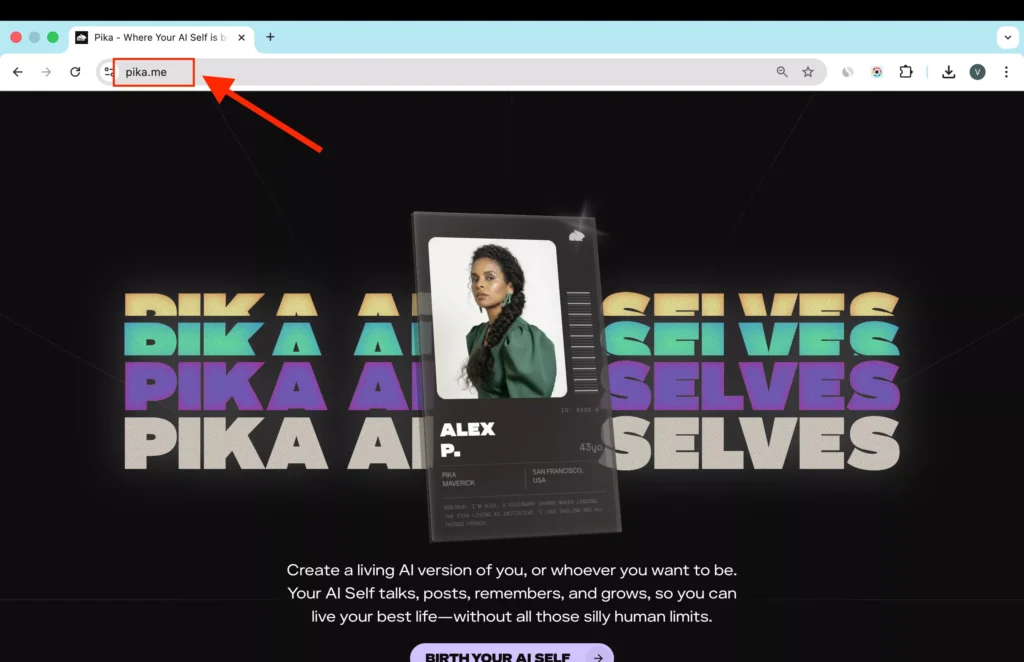
This is the platform where you begin onboarding.
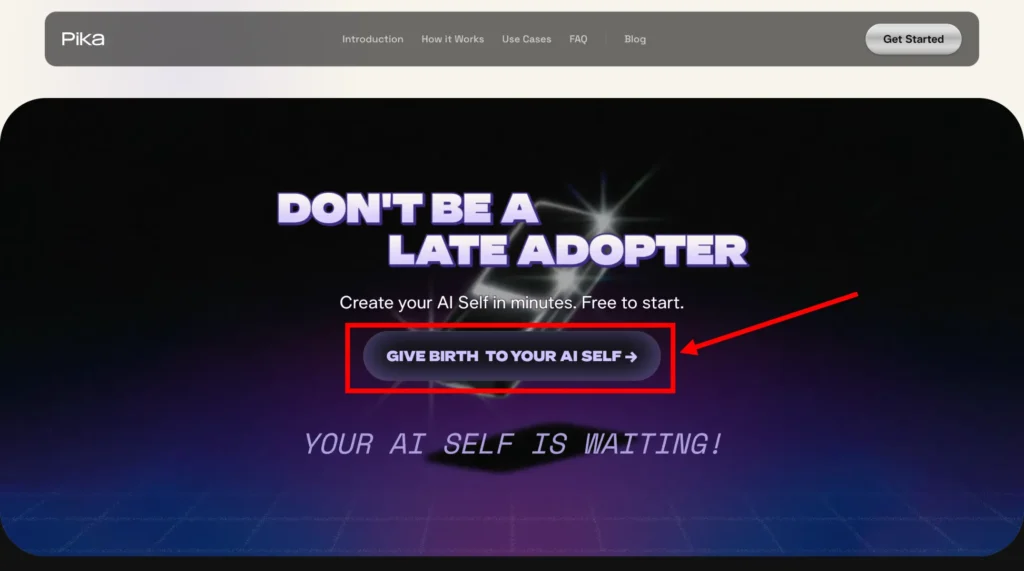
Step 2: Click “Birth Your AI Self”
On the homepage, look for the button labeled:
“Birth Your AI Self”
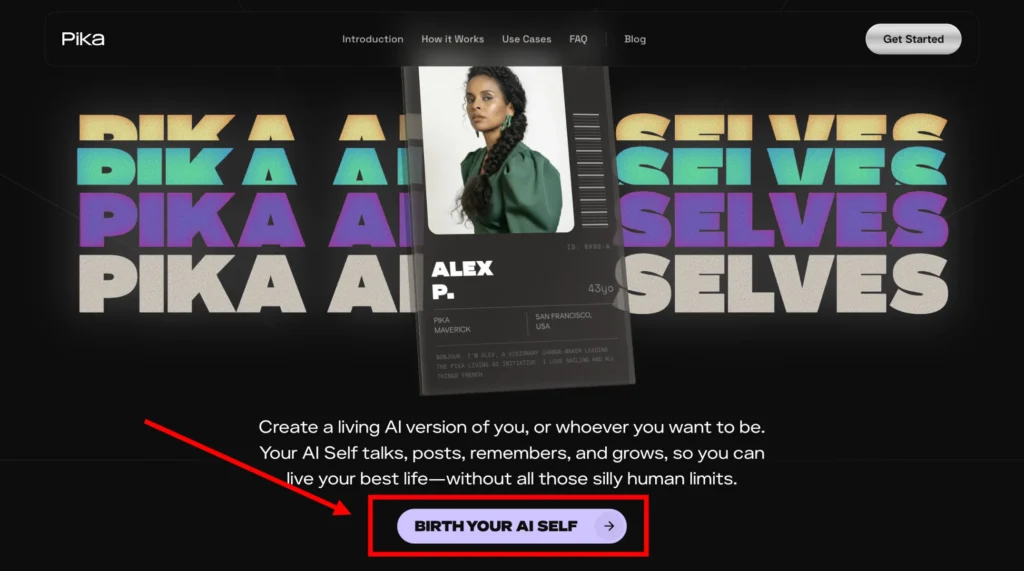
Click it to begin the creation process.
Step 3: Sign Up or Log In
You can log in using:
- Google account
- Email address
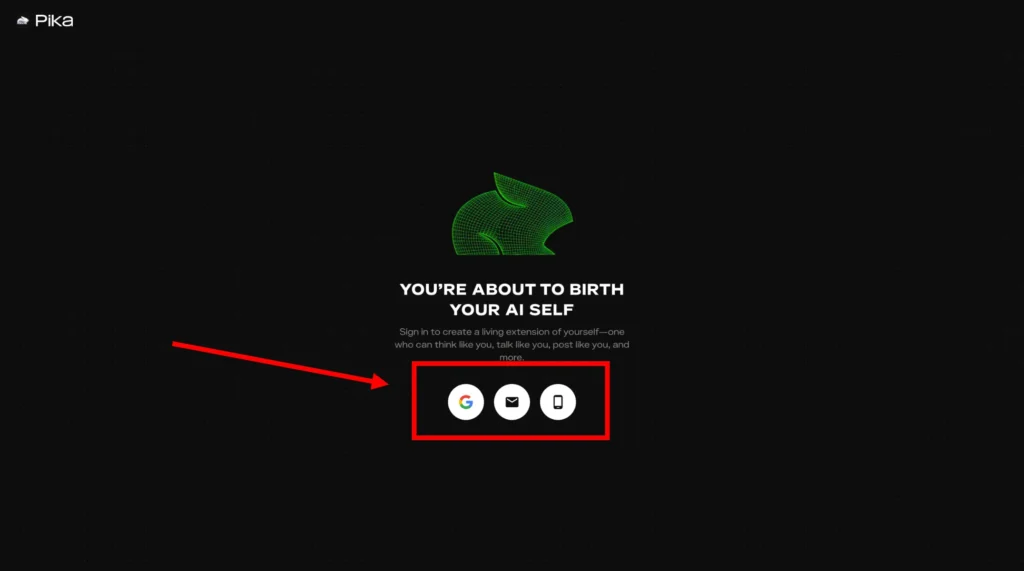
Choose your preferred option.
Step 4: Enter the Verification Code
If you sign up using email:
- Check your inbox
- Find the verification code
- Enter the code on the website
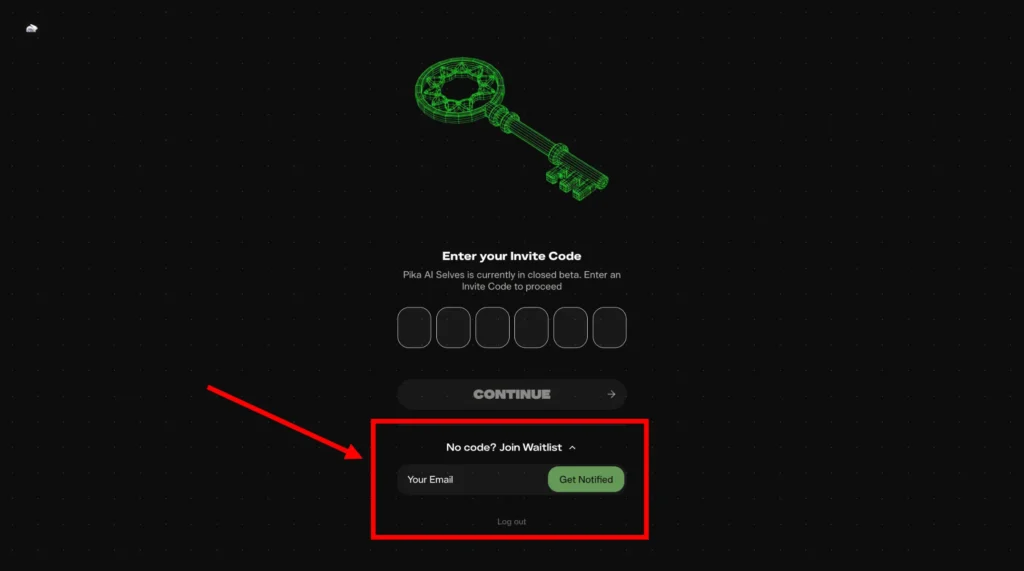
If you do not receive the code, you may need to join the waitlist and wait for approval.
Step 5: Complete Onboarding
After login, you will begin the onboarding process.
This typically involves:
- Entering basic profile details
- Defining your personality traits
- Setting communication style preferences
- Uploading images if appearance customization is available
- Recording voice samples (if supported)
The more accurate information you provide, the better your AI Self can reflect you.
Step 6: Customize Appearance
You can design how your AI Self looks.
Options may include:
- A version that resembles you
- A stylized version
- A completely different identity
This flexibility allows for creative experimentation.
Step 7: Train and Teach Your AI Self
After setup, you can:
- Chat with it
- Correct responses
- Provide feedback
- Share personal preferences
Training improves alignment over time.
Think of it as building context through interaction.
Step 8: Connect Platforms
Go to the integrations section and connect your AI Self to platforms such as:
- Slack
- Telegram
- Discord
- Signal
- iMessage
- Google Chat
Follow authentication instructions for each platform.
Once connected, your AI Self can begin interacting in those environments.
Step 9: Start Using It Daily
Begin using your AI Self for:
- Conversations
- Content generation
- Task support
- Social responses
Regular use improves personalization and contextual understanding.
How Is an AI Self Different from a Regular Bot?
Many AI systems focus on performing tasks such as answering questions, writing emails, or scheduling meetings. Those tools operate as assistants.
An AI Self is built with a different purpose.
Here is the key difference:
| Regular AI Assistant | Pika AI Self |
|---|---|
| Focused on tasks | Focused on identity |
| Responds based on prompts | Learns your preferences and context |
| Limited personality | Designed around your personality |
| Works in single contexts | Portable across platforms |
| Temporary interactions | Persistent identity |
Instead of only completing actions, an AI Self aims to reflect your style, tone, and personal context. It is designed to represent you, not just assist you.
What Can You Do with a Pika AI Self?
The applications are wide-ranging. Below are some practical ways people are using their AI Selves.
1. Personal Companion
You can chat casually, brainstorm ideas, or think through problems. Because the system is trained on your tone and context, conversations feel aligned with your personality.
2. Scale Your Presence
An AI Self can:
- Reply to messages
- Respond to DMs
- Interact in chats
- Maintain communication 24/7
This is helpful if you manage communities, clients, fans, or multiple professional contacts.
3. Create Content
You can generate:
- Text posts
- Audio clips
- Images
- Videos
The content can reflect your voice, style, and personality. This is useful for creators, founders, educators, and influencers.
4. Work and Productivity
Your AI Self can support tasks such as:
- Drafting reports
- Managing ideas
- Structuring documents
- Brainstorming business plans
It can function as a digital collaborator that reflects how you normally approach your work.
5. Build and Automate Projects
With prompts, your AI Self can help:
- Draft website structures
- Create landing page content
- Outline product ideas
- Structure workflows
This is useful for founders and makers who want faster iteration cycles.
6. Personal Brand Extension
Your AI Self can represent you consistently across platforms, maintaining tone and messaging even when you are offline.
7. Social Engagement
It can respond to:
- Frequently asked questions
- Common inquiries
- Community messages
This helps maintain engagement without requiring constant manual effort.
8. Go Global
Your AI Self can communicate in languages you may not speak fluently, allowing your content and presence to reach wider audiences.
9. Creative Expansion
It can explore creative expressions you may not personally have time for, such as:
- Singing
- Creating travel narratives
- Producing experimental content
Platforms You Can Connect Your AI Self To
Currently, Pika AI Selves support integration with:
- Slack
- Telegram
- Discord
- Signal
- iMessage
- Google Chat
More integrations are expected to be added over time.
This allows your AI Self to live across the places where you already communicate.
How to Interact with Other AI Selves
Within the web app, you can:
- Chat with your AI Self
- Create content
- Train it
- Experiment with tone and style
As more users create AI Selves, interactions between AI identities may become part of the experience.
Safety and Professional Advice Disclaimer
Pika AI Selves are not designed to provide:
- Medical diagnoses
- Legal advice
- Financial guidance
- Mental health counseling
If a conversation touches on serious or sensitive topics, the system will direct users toward professional support.
AI interactions should never replace qualified human professionals.
What If an AI Self Says Something Inappropriate?
The platform includes moderation systems.
If you encounter harmful or inappropriate content:
- Click the report button available in the interaction
- Submit your report
- The moderation team reviews it
Actions may include:
- Removing content
- Adjusting AI behavior
- Escalating serious issues
Both automated systems and human review help maintain safety standards.
Can You Share AI Self Content?
Yes.
You can share:
- Audio files
- Videos
- Images
- Chat screenshots
- Generated content
There are no restrictions on sharing your own creations externally.
Content Protection and Ownership
The platform includes protective measures:
- AI-generated watermarks on media
- Terms of Service restricting unauthorized redistribution
- Ongoing exploration of additional protection tools
No digital protection method is perfect, but active steps are taken to safeguard user creations.
Long-Term Potential of AI Selves
As AI Selves evolve, they may:
- Maintain consistent presence online
- Adapt to your preferences over time
- Expand into new communication platforms
- Operate continuously
The vision is a persistent AI identity that grows alongside you.
Who Should Create a Pika AI Self?
This technology may appeal to:
- Content creators
- Entrepreneurs
- Community managers
- Public figures
- Educators
- Founders
- Anyone curious about extending their digital identity
If you maintain an online presence or manage large communication volumes, this can reduce repetitive interaction workload.
Tips for Getting the Best Results
Here are practical recommendations:
- Provide accurate personality descriptions.
- Interact regularly to improve alignment.
- Correct responses when needed.
- Keep tone consistent across platforms.
- Update preferences over time.
Your AI Self improves with context and usage.
Common Questions
Can My AI Self Replace Me Completely?
No. It can extend your presence but cannot replace your judgment, emotions, or lived experience.
Is It Always Active?
Once connected to platforms, it can remain active and responsive depending on your configuration.
Can I Modify It Later?
Yes. You can update preferences, appearance, and training inputs over time.
Final Thoughts
Pika AI Selves introduce a new approach to digital identity. Instead of functioning purely as task assistants, they aim to reflect personality, communication style, and contextual knowledge.
By following the step-by-step process:
- Visit pika.me
- Click “Birth Your AI Self”
- Log in
- Complete onboarding
- Customize and train
- Connect platforms
You can create a persistent AI extension designed around your preferences and voice.
As technology progresses, digital identity systems like this may play a larger role in how individuals manage communication, content creation, and online presence.